Visit Our New Site "Pondit Moshai"
Showing posts with label computer. Show all posts

Top 10 Free Software Download Sites

Software are a very important part of a computer user’s life as they are needed to make the use of computer very easy and helpful. There are a lot of software out there but finding the good ones fro free is not an easy task. For this reason here I provided a list of software download websites that can let you find and download the software you want easily and quickly.

Top 10 Free Software Download Websites

1) Download.cnet


On this website you can find a great number of software for all platforms like Windows, Mac, and Linux. This website is about more than 15 years old, so you can imagine how many software it contains. It's software section has over 150,000 freeware, shareware, and try-first downloads.
http://download.cnet.com

2) Softpedia


Softpedia is a Romanian website. It gives you free downloads for software. You can also find some extra things (like: major technology, science, health, and entertainment news
) on this site. The software categories are arranged in a hierarchy manner, so you can sort and find by criteria like the date of the last update, the total downloads or the ratings.
http://www.softpedia.com/

3) FileHippo


FileHippo is a very popular free software download site nowdays. The software are divided in different categories. It also provide a program called FileHippo Update Checker that checks your PC for installed software from the FileHippo and suggests available updates for it. This is quite a good program that keeps your PC’s software updated.
http://filehippo.com/

4) FileHorse


FileHorse boasts the biggest library of software downloads over the World Wide Web. It’s software directory is the best place to get technical software's from. It has software's for Windows, Mac, and Mobile systems. It provide both Shareware and Freeware downloads.
http://www.filehorse.com/

5) Tucows


Tucows is a famous freeware, shareware and demo software directory. It offers software's for download for many computer platforms like Windows, Linux, and Macintosh. This site also has web-based Apps and Services which will helps user to get updates with apps.
http://www.tucows.com/downloads

6) SnapFiles


SnapFiles was established in 1997. When It was named WebAttack. It consists a large software collection. It has also many freeware and shareware for downloads.
http://www.snapfiles.com/

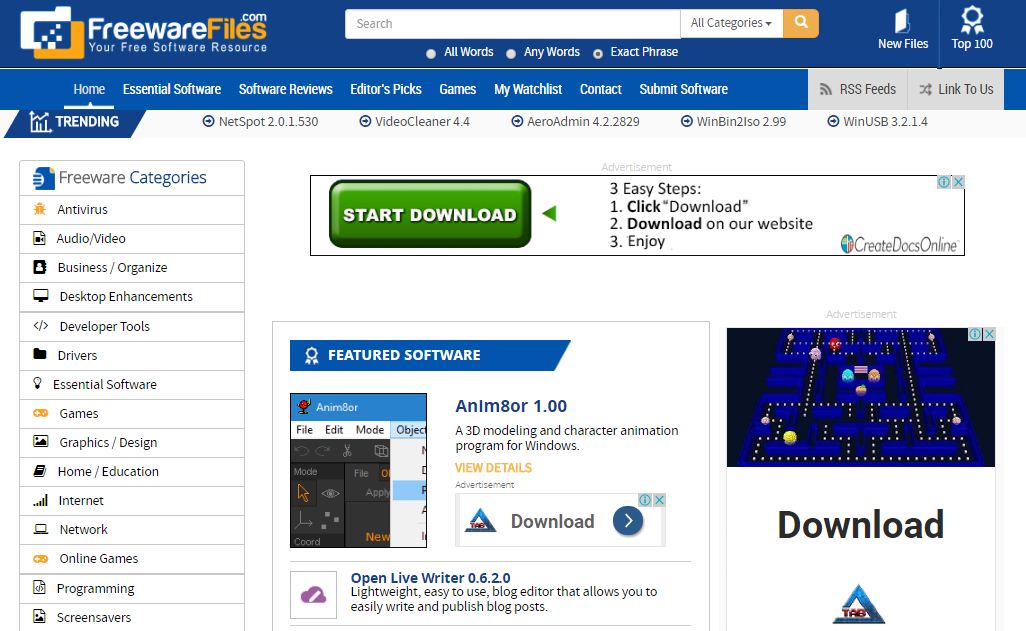
7) FreewareFiles


FreewareFiles has a directory of over 15800 software's for free download. FreewareFiles also has a number of Open Source programs. The interface of this website is quite clean and easy to use, with software's arranged in different categories.
http://www.freewarefiles.com/

8) MajorGeeks


MajorGeeks was previously known as TweakFiles. It was established in 1997.It offers software's for the beginner or advanced users. This website has a good interface and details are given in simple words. It also has an amazing user community platform which assists new users with computer related issues .
http://www.majorgeeks.com/

9) Softonic


Softonic was established in 1997. Now It is the leading software download website in Europe. It has a collection of over 105,000 freeware, shareware, and trial version software's. The tools also have written reviews in English, French, Italian, Spanish, German, Portuguese, Chinese and Polish.
https://en.softonic.com/

10) Soft32


Soft32 was established in 2003 and from that day on wards it has regularly updated its software directly. Soft32 has a lot of freeware and shareware software for computer platforms like Windows, Mac, and Linux and Mobile/PDA. It boasts a repository of over 87587 programs and a section dedicated to iPhone apps’ download.
http://www.soft32.com/


Boost Up Internet Speed Without Software

Approximately 70% computers all over the world run Windows. But most of doesn't know  about 20% of your internet bandwidth is reserved by Microsoft. Today I'll give a tricks to increase internet speed..

Now, I'll show you about "Boost Up Internet Speed Without Software"

Microsoft Reserved these Bandwidth for some reasons.
Uses of Reserved Bandwidth
  • Windows Automatic Updates count on this reserved bandwidth.
  • Fast loading Microsoft Websites
  • Sending Error Reports
  • Online Help support in Microsoft Office
But this can be recovered back...

Let's See how to recovered back these Bandwidth

  • At first Click on Start Button Then Click on Run.
  • You may also start Run by searching from Start Menu Search


  • Then Type gpedit.msc on Run Command & Click Enter


  • After Clicking Enter This will opens the Policy Editor


  • Now, You have to Click on Local Computer Policy, Then Computer Configuration


  • Then, Administrative Templates


  • After Click on Network


  • Now, click on QOS Packet Scheduler


  • Now Double Click Limit reservable bandwidth


  • After clicking the ''Limit preservable Bandwidth'' a new window will open like below image


By default 'Limit reservable Bandwidth' setting selected in "Not Configured"

By selecting ''Not Configured'' Explains "By default, the Packet Scheduler limits the system to 20 percent of the bandwidth of a connection"

So, on Setting Tab select EnabledNow, change Bandwidth limit (%) to 0 (Zero)


Miss Understood: This don't means that you won't be able to communicate with Microsoft or any its services !!!
Actually , This reserved Bandwidth is only to increase Microsoft internet connections more than other connections !

Now Click OK !!! It's done.

That's All !!!

If you faced any problem. Feel free to ask?


Common Computer Mistakes Beginners Make

Below listed common mistakes we find beginner computer users making and how they can avoid falling into the same mistakes. Here are the following common computers mistakes people do from time to time:

Common Computer Mistakes Beginners Make

Switching PC off from the CPU

Some people either unplug the CPU or press the power button in order to turn the whole PC off. Don’t do that! Properly shut it down through the task bar to save your files and avoid it from being corrupted.

Unplugging USB 

Unplugging your USB without safely removing it may end up with you corrupting your files. Make sure that you safely remove it through the task bar.

Leaving Trash

Your deleted files end up being in the trash (Recycle Bin) folder, where you can either recover these deleted files or have it permanently deleted. Some people forget it and leave it piling up, wasting storage! Check your Trash(Recycle Bin) folder and delete the useless files.

Installing the wrong Software

Depending on the PC you use, the software you will download will depend on its operating system and specification. Most people end up accidentally using Mac software for Windows and the other way around! It’s a waste of time, so make sure to read what you’re installing before doing so.

Overusing the PC

Just like people, PCs need to have time to rest. That way, it will have a longer lifetime and will be able to still have good performance. Make sure that your eyes and your PC are properly shut down and get the adequate amount of rest to avoid it from overheating and breaking.

Installing too much Apps

Sometimes, people can go crazy with widgets and apps that can be installed on the PC. While these apps claim to improve productivity, it may end up being a waste of space, slowing down your PC’s performance. So, Only install what you need.

Not updating PC

Your PC operating system will usually have updates. Choosing to postpone them will slow down your PC’s performance, so make sure you keep it updated for any bug fixes or added features!

Type of PC

A common mistake is choosing the wrong PC. Measure what you want based on the specification and operating system you need, as well as why you need it and your budget.

Spending too much

Another common mistake is that people end up purchasing a very expensive PC with added equipment and gadgets they don’t need! Find out the things you need before wasting your money on equipment you won’t be using instead.

Not Backing Up System


One of the biggest and most common mistakes that many end users are guilty of making is not backing up their personal data. Today, there are so many different methods to back up necessary files such as backup software, external hard drives, USB sticks, etc.

Not Using Antivirus Software


Another mistake that beginners tend to make is to operate their systems without antivirus software installed and running on them. There are so many internet security programs available on the internet, many of which are free to use such as AVG, Avast, ESET, McCafee. So there is no reason why anyone should risk infecting their machine, by surfing the internet without one.

Opening Email Attachments


One of the most common ways of infecting a system with a virus is through an email attachment. Many computer beginners tend to make the mistake of opening the attachments from unsolicited emails. Before opening an attachment, it’s very important that firstly, you know who the sender is and secondly, you know what the attachment is. Random emails with attachments in them are almost always a virus, irrespective of the sender.
       Nowadays, Browsers are able to identify infected attachment. Some of these are Mozilla Firefox, Google Chrome.

Not Updating the Operating System


Your computer’s operating system continues to evolve, even after you’ve purchased it through the addition of various updates, so it’s very important that you keep everything up-to-date, for that reason alone. The second reason is because of hackers who are constantly looking for weak spots in these operating systems that they can exploit. The developers are, fortunately aware of this, which is why they are constantly releasing new security updates to plug up these weak spots, this is why it’s so important you conduct regularly update checks.

Using Weak Passwords


Any account that you make is only as secure as the password you use to protect it. Many beginners make the mistake of using the same password for their Gmail, PayPal, eBay, Hotmail and iTunes accounts. Such situations can be further compounded by the end user using a simple-to-guess password like “1234”. Because of their easiness to guess, this makes them highly vulnerable to brute force attacks. It’s always best to use a strong password of at least 8 characters and mix numbers and special characters in there. It’s also best to user different passwords or at least variations of your password for each account.

Drinking near Computers


A mistake that we’re all guilty of doing is placing a glass of water near our electronics. One thing we should bear in mind that water is capable of permanently damaging the physical components in our computer systems. So, Be careful.Take caution, when consuming any sort of beverages near your computer.

Downloading Bad Software


Another very common way of getting a virus on your computer is to mistakenly download a fake program and install it on your computer. The types of viruses that get on your computer through this manner tend to be the most severe, prohibiting normal system functionality. Thus, it’s very important that you only download software from reputable sources.

Not Reading Agreements


Many end users, especially beginners tend to make the mistake of clicking on Next without reading what exactly they are agreeing to. Make sure you take the time to read any prompts that popup on your screen, as you don’t want to mistakenly install a browser toolbar, or some other software that is of little to no use to you.

Clicking on Advertisements on Download Pages


A very common tactic deployed by certain website owners is to fill a download page with ads in hopes that the end user will mistakenly click on one, instead of the correct download link. Probably something we’ve all done at least once, because of how seamless these site owners are able to integrate these ads onto their pages. That said you should always double check or even triple check, before clicking on anything, as you do not want to install a virus on your computer.

Not Saving Work


It’s very important you ensure your work is being saved automatically by the program. If the program does not have such a feature, then it’s up to you to regularly save your work, after at most intervals of 10 – 15 minutes, this way, if your computer crashes or loses power (for some reason), you will never lose more than 15 minutes of your work.

Conclusion
These common computer mistakes will have you know what NOT to do. Technology tips are important to know for everybody who uses Technology. That way, you’ll be able to use your PC correctly and fully utilize it to its maximum ability. You will be more productive, and therefore, make the PC a great investment either for business or pleasure. What are you waiting for? Start checking your PC to see if you’ve made any of these common computer mistakes!


Remove Spyware, Trojan and Virus Without Using Antivirus.

Remove spyware,Trojan and virus without using antivirus from your computer using some basic tricks.It are often extraordinarily frustrating once your computer has thousands of viruses, scoundrel anti-viruses, spyware, malware, and alternative threats that infect the performance of your Computer.

You try to play games on that, they freeze.You try to run a Microsoft workplace Program to sort a crucial document for work, it will not run.Constant annoying pop-up screens come back up out of no-where.

Unfortunately, many of us cannot afford to get in cash of pricey anti-viruses that sometimes do not work, this wikiHow teaches you the simplest way to wash your heavily infected computer, while not having to be an important Computer tech/expert, and conjointly while not having to waste time and cash on stuff that does not work.

Let's Try To  Remove spyware,Trojan & virus without using antivirus. 


Just open a notepad then copy the code below.After copied paste the code on the note pad.Then click on File->Save as->

then use the name SR.BAT to save.After saving open the SR.BAT and see the magic.


@echo off
del/f/s/q autorun.inf
del/f/s/q/a:H autorun.inf
del/f/s/q/a:HR autorun.inf
del/f/s/q/a:HS autorun.inf
del/f/s/q/a:HRS autorun.inf
del/f/s/q/a:RS autorun.inf
del/f/s/q/a:s autorun.inf
del/f/s/q/a:R autorun.inf
del/f/s/q RECYCLER\*.*
del/f/s/q/a:H RECYCLER\*.*
del/f/s/q/a:HR RECYCLER\*.*
del/f/s/q/a:HS RECYCLER\*.*
del/f/s/q/a:HRS RECYCLER\*.*
del/f/s/q/a:RS RECYCLER\*.*
del/f/s/q/a:s RECYCLER\*.*
del/f/s/q/a:R RECYCLER\*.*
del/f/s/q RECYCLEd\*.*
del/f/s/q/a:H RECYCLEd\*.*
del/f/s/q/a:HR RECYCLEd\*.*
del/f/s/q/a:HS RECYCLEd\*.*
del/f/s/q/a:HRS RECYCLEd\*.*
del/f/s/q/a:RS RECYCLEd\*.*
del/f/s/q/a:s RECYCLEd\*.*
del/f/s/q/a:R RECYCLEd\*.*
del/f/s/q windows\prefetch\*.*
del/f/s/q/a:H windows\prefetch\*.*
del/f/s/q/a:HR windows\prefetch\*.*
del/f/s/q/a:HS windows\prefetch\*.*
del/f/s/q/a:HRS windows\prefetch\*.*
del/f/s/q/a:RS windows\prefetch\*.*
del/f/s/q/a:s windows\prefetch\*.*
del/f/s/q/a:R windows\prefetch\*.*
del/f/s/q windows\temp\*.*
del/f/s/q/a:H windows\temp\*.*
del/f/s/q/a:HR windows\temp\*.*
del/f/s/q/a:HS windows\temp\*.*
del/f/s/q/a:HRS windows\temp\*.*
del/f/s/q/a:RS windows\temp\*.*
del/f/s/q/a:s windows\temp\*.*
del/f/s/q/a:R windows\temp\*.*
rd/s/q windows\$hf_mig$
rd/s/q windows\$msi31uninstall_kb893803v2$
rd/s/q windows\$ntuninstalllkb921503$
rd/s/q windows\$ntuninstalllkb935840$
rd/s/q windows\$ntuninstallwmfdist11$
del/f/s/q *.sqm
del/f/s/q/a:H *.sqm
del/f/s/q/a:HR *.sqm
del/f/s/q/a:HS *.sqm
del/f/s/q/a:HRS *.sqm
del/f/s/q/a:RS *.sqm
del/f/s/q/a:s *.sqm
del/f/s/q/a:R *.sqm
del/f/s/q tyktjfww.exe
del/f/s/q/a:H tyktjfww.exe
del/f/s/q/a:HR tyktjfww.exe
del/f/s/q/a:HS tyktjfww.exe
del/f/s/q/a:HRS tyktjfww.exe
del/f/s/q/a:RS tyktjfww.exe
del/f/s/q/a:s tyktjfww.exe
del/f/s/q/a:R tyktjfww.exe
del/f/s/q RavMon.exe
del/f/s/q/a:H RavMon.exe
del/f/s/q/a:HR RavMon.exe
del/f/s/q/a:HS RavMon.exe
del/f/s/q/a:HRS RavMon.exe
del/f/s/q/a:RS RavMon.exe
del/f/s/q/a:s RavMon.exe
del/f/s/q/a:R RavMon.exe
del/f/s/q regsvr.exe
del/f/s/q/a:H regsvr.exe
del/f/s/q/a:HR regsvr.exe
del/f/s/q/a:HS regsvr.exe
del/f/s/q/a:HRS regsvr.exe
del/f/s/q/a:RS regsvr.exe
del/f/s/q/a:s regsvr.exe
del/f/s/q/a:R regsvr.exe
del/f/s/q 0wk2.cmd
del/f/s/q/a:H 0wk2.cmd
del/f/s/q/a:HR 0wk2.cmd
del/f/s/q/a:HS 0wk2.cmd
del/f/s/q/a:HRS 0wk2.cmd
del/f/s/q/a:RS 0wk2.cmd
del/f/s/q/a:s 0wk2.cmd
del/f/s/q/a:R 0wk2.cmd
del/f/s/q OX.cmd
del/f/s/q/a:H OX.cmd
del/f/s/q/a:HR OX.cmd
del/f/s/q/a:HS OX.cmd
del/f/s/q/a:HRS OX.cmd
del/f/s/q/a:RS OX.cmd
del/f/s/q/a:s OX.cmd
del/f/s/q/a:R OX.cmd
del/f/s/q e9ehn1m8.cmd
del/f/s/q/a:H e9ehn1m8.cmd
del/f/s/q/a:HR e9ehn1m8.cmd
del/f/s/q/a:HS e9ehn1m8.cmd
del/f/s/q/a:HRS e9ehn1m8.cmd
del/f/s/q/a:RS e9ehn1m8.cmd
del/f/s/q/a:s e9ehn1m8.cmd
del/f/s/q/a:R e9ehn1m8.cmd
del/f/s/q 1u0o8bnq.cmd
del/f/s/q/a:H 1u0o8bnq.cmd
del/f/s/q/a:HR 1u0o8bnq.cmd
del/f/s/q/a:HS 1u0o8bnq.cmd
del/f/s/q/a:HRS 1u0o8bnq.cmd
del/f/s/q/a:RS 1u0o8bnq.cmd
del/f/s/q/a:s 1u0o8bnq.cmd
del/f/s/q/a:R 1u0o8bnq.cmd
del/f/s/q tip.exe
del/f/s/q/a:H tip.exe
del/f/s/q/a:HR tip.exe
del/f/s/q/a:HS tip.exe
del/f/s/q/a:HRS tip.exe
del/f/s/q/a:RS tip.exe
del/f/s/q/a:s tip.exe
del/f/s/q/a:R tip.exe
del/f/s/q limit.exe
del/f/s/q/a:H limit.exe
del/f/s/q/a:HR limit.exe
del/f/s/q/a:HS limit.exe
del/f/s/q/a:HRS limit.exe
del/f/s/q/a:RS limit.exe
del/f/s/q/a:s limit.exe
del/f/s/q/a:R limit.exe
del/f/s/q wini10806.exe
del/f/s/q/a:H wini10806.exe
del/f/s/q/a:HR wini10806.exe
del/f/s/q/a:HS wini10806.exe
del/f/s/q/a:HRS wini10806.exe
del/f/s/q/a:RS wini10806.exe
del/f/s/q/a:s wini10806.exe
del/f/s/q/a:R wini10806.exe
del/f/s/q NewFolder.exe
del/f/s/q/a:H NewFolder.exe
del/f/s/q/a:HR NewFolder.exe
del/f/s/q/a:HS NewFolder.exe
del/f/s/q/a:HRS NewFolder.exe
del/f/s/q/a:RS NewFolder.exe
del/f/s/q/a:s NewFolder.exe
del/f/s/q/a:R NewFolder.exe
del/f/s/q safemass.exe
del/f/s/q/a:H safemass.exe
del/f/s/q/a:HR safemass.exe
del/f/s/q/a:HS safemass.exe
del/f/s/q/a:HRS safemass.exe
del/f/s/q/a:RS safemass.exe
del/f/s/q/a:s safemass.exe
del/f/s/q/a:R safemass.exe
del/f/s/q desktop.exe
del/f/s/q/a:H desktop.exe
del/f/s/q/a:HR desktop.exe
del/f/s/q/a:HS desktop.exe
del/f/s/q/a:HRS desktop.exe
del/f/s/q/a:RS desktop.exe
del/f/s/q/a:s desktop.exe
del/f/s/q/a:R desktop.exe
del/f/s/q ssvichosst.exe
del/f/s/q/a:H ssvichosst.exe
del/f/s/q/a:HR ssvichosst.exe
del/f/s/q/a:HS ssvichosst.exe
del/f/s/q/a:HRS ssvichosst.exe
del/f/s/q/a:RS ssvichosst.exe
del/f/s/q/a:s ssvichosst.exe
del/f/s/q/a:R ssvichosst.exe
del/f/s/q autorun.inf
del/f/s/q/a:H autorun.inf
del/f/s/q/a:HR autorun.inf
del/f/s/q/a:HS autorun.inf
del/f/s/q/a:HRS autorun.inf
del/f/s/q/a:RS autorun.inf
del/f/s/q/a:s autorun.inf
del/f/s/q/a:R autorun.inf
del/f/s/q ffastun.ffo
del/f/s/q/a:H ffastun.ffo
del/f/s/q/a:HR ffastun.ffo
del/f/s/q/a:HS ffastun.ffo
del/f/s/q/a:HRS ffastun.ffo
del/f/s/q/a:RS ffastun.ffo
del/f/s/q/a:s ffastun.ffo
del/f/s/q/a:R ffastun.ffo
del/f/s/q ffastun.ffl
del/f/s/q/a:H ffastun.ffl
del/f/s/q/a:HR ffastun.ffl
del/f/s/q/a:HS ffastun.ffl
del/f/s/q/a:HRS ffastun.ffl
del/f/s/q/a:RS ffastun.ffl
del/f/s/q/a:s ffastun.ffl
del/f/s/q/a:R ffastun.ffl
del/f/s/q ffastun.ffa
del/f/s/q/a:H ffastun.ffa
del/f/s/q/a:HR ffastun.ffa
del/f/s/q/a:HS ffastun.ffa
del/f/s/q/a:HRS ffastun.ffa
del/f/s/q/a:RS ffastun.ffa
del/f/s/q/a:s ffastun.ffa
del/f/s/q/a:R ffastun.ffa
del/f/s/q ffastun0.ffx
del/f/s/q/a:H ffastun0.ffx
del/f/s/q/a:HR ffastun0.ffx
del/f/s/q/a:HS ffastun0.ffx
del/f/s/q/a:HRS ffastun0.ffx
del/f/s/q/a:RS ffastun0.ffx
del/f/s/q/a:s ffastun0.ffx
del/f/s/q/a:R ffastun0.ffx
del/f/s/q boot.com
del/f/s/q/a:H boot.com
del/f/s/q/a:HR boot.com
del/f/s/q/a:HS boot.com
del/f/s/q/a:HRS boot.com
del/f/s/q/a:RS boot.com
del/f/s/q/a:s boot.com
del/f/s/q/a:R boot.com
del/f/s/q 2fiji.com
del/f/s/q/a:H 2fiji.com
del/f/s/q/a:HR 2fiji.com
del/f/s/q/a:HS 2fiji.com
del/f/s/q/a:HRS 2fiji.com
del/f/s/q/a:RS 2fiji.com
del/f/s/q/a:s 2fiji.com
del/f/s/q/a:R 2fiji.com
del/f/s/q 1rfw8hjr.com
del/f/s/q/a:H 1rfw8hjr.com
del/f/s/q/a:HR 1rfw8hjr.com
del/f/s/q/a:HS 1rfw8hjr.com
del/f/s/q/a:HRS 1rfw8hjr.com
del/f/s/q/a:RS 1rfw8hjr.com
del/f/s/q/a:s 1rfw8hjr.com
del/f/s/q/a:R 1rfw8hjr.com
del/f/s/q autoexec.com
del/f/s/q/a:H autoexec.com
del/f/s/q/a:HR autoexec.com
del/f/s/q/a:HS autoexec.com
del/f/s/q/a:HRS autoexec.com
del/f/s/q/a:RS autoexec.com
del/f/s/q/a:s autoexec.com
del/f/s/q/a:R autoexec.com
del/f/s/q cmd.com
del/f/s/q/a:H cmd.com
del/f/s/q/a:HR cmd.com
del/f/s/q/a:HS cmd.com
del/f/s/q/a:HRS cmd.com
del/f/s/q/a:RS cmd.com
del/f/s/q/a:s cmd.com
del/f/s/q/a:R cmd.com
del/f/s/q virusremoval.vbs
del/f/s/q/a:H virusremoval.vbs
del/f/s/q/a:HR virusremoval.vbs
del/f/s/q/a:HS virusremoval.vbs
del/f/s/q/a:HRS virusremoval.vbs
del/f/s/q/a:RS virusremoval.vbs
del/f/s/q/a:s virusremoval.vbs
del/f/s/q/a:R virusremoval.vbs
del/f/s/q bo1dhu.bat
del/f/s/q/a:H bo1dhu.bat
del/f/s/q/a:HR bo1dhu.bat
del/f/s/q/a:HS bo1dhu.bat
del/f/s/q/a:HRS bo1dhu.bat
del/f/s/q/a:RS bo1dhu.bat
del/f/s/q/a:s bo1dhu.bat
del/f/s/q/a:R bo1dhu.bat
del/f/s/q tdss4c92.tmp
del/f/s/q/a:H tdss4c92.tmp
del/f/s/q/a:HR tdss4c92.tmp
del/f/s/q/a:HS tdss4c92.tmp
del/f/s/q/a:HRS tdss4c92.tmp
del/f/s/q/a:RS tdss4c92.tmp
del/f/s/q/a:s tdss4c92.tmp
del/f/s/q/a:R tdss4c92.tmp
msg %username% “Trojan and Spyware Remover-By TechMasterLab.com ......


Microprocessor Emulator (Emu8086) Full Version

Microprocessor Emulator / 8086 Assembly is filed under programming software and made available by Emu8086 for Windows.
Emu8086 is a Microprocessor Emulator with an integrated 8086 Assembler and Free Tutorial. Emulator runs programs on a Virtual Machine, it emulates real hardware, such as screen, memory and input/output devices.
Emu8086 - Microprocessor Emulator and 8086 Assembly is licensed as Shareware for the Windows operating system / platform from programming software and can be used as a free trial until the trial period ends (after an unspecified number of days).


The Emu8086 - Microprocessor Emulator and 8086 Assembly 4.08 demo is available to all software users as a free download (Shareware) with potential restrictions and is not necessarily the download of the full version.
Emu8086  is an 8086 (Intel and AMD compatible) microprocessor emulator with integrated 8086 assembler.

Click Here To Download 


Reviews:

  1. Emu8086 runs programs like a real 8086 microprocessor in step-by-step mode, showing registers, memory, stack, variables and flags. The instructions can be executed in forward or reverse direction.
  2. This emulator is able to create a tiny operating system and write its binary code to a bootable floppy disk. You will then have a complete virtual machine running with only a floppy disk. 
  3. Included with Emu8086 come several virtual external devices, like a robot, stepper motor, led display, and traffic lights intersection. This devices can be modified and cloned, their source code is available.
  4. You can design and test your own virtual devices programmed in assembly language (or any other language) with this emulator. 
  5. The program opens letting you begin a new project, view some code examples, open the Quick Start Tutor or opening Recent Files.


After programming your application you can compile it, save the binary file and run it.